
Best for: graphic designers, web developers, bloggers, marketers and content creators who need high-quality, curated fonts licensed for commercial use without a subscription or purchase, and developers who need a webfont generator to convert desktop fonts into browser-ready formats.
Pricing: Completely free. No subscription, no registration required to download. Ad-supported. Font Squirrel’s sister site Fontspring sells premium paid fonts from the same foundry network.
Library: Hand-curated collection of free fonts licensed for commercial use. Smaller than Google Fonts or DaFont by volume, but manually vetted for quality and licensing compliance.
Biggest strength: every font in the library is hand-picked and verified for commercial-use licensing. The Webfont Generator converts any desktop font into browser-ready formats (WOFF, WOFF2, EOT, SVG) with auto-generated @font-face CSS. A free tool that would otherwise require paid software or manual conversion.
Main weakness: smaller library than Google Fonts (1,500+ open source) or DaFont (46,000+ styles). No variable font support in the Webfont Generator. Some fonts redirect to external foundry websites rather than hosting the download directly. Ads shown to non-subscribers.
Bottom line: the most reliable free source for commercial-use fonts with a genuinely useful Webfont Generator tool. For raw font volume, Google Fonts and DaFont are broader. For paid premium fonts, Adobe Fonts (CC users) and Fontspring are the logical upgrades.
Font Squirrel is a free online font platform founded and operated by Ethan Dunham, focused exclusively on curating high-quality fonts that are licensed for commercial use. As confirmed by the official Font Squirrel FAQ and ManyTools’ 2026 review, the platform hand-picks every typeface it features rather than accepting open submissions, which keeps the library smaller but more reliable from a licensing perspective.
The platform is funded by advertising and operates as a free service. No account, subscription or payment is required to browse or download fonts. Font Squirrel also operates Fontspring, a sister site for purchasing premium paid fonts from the same network of foundries when free options are not sufficient for a project.
Table of Contents
How We Researched This Review
Platform model: free, ad-supported, hand-curated confirmed from the official Font Squirrel homepage and FAQ.
Webfont Generator: converts TTF/OTF to WOFF, WOFF2, EOT, SVG with @font-face CSS output confirmed from Easyweb’s 2026 analysis and the official Font Squirrel FAQ.
Font Identifier: matches uploaded images against Font Squirrel, Fontspring and MyFonts databases confirmed from the official Font Squirrel FAQ.
No variable font support: confirmed from Easyweb’s 2026 analysis as a current limitation of the Webfont Generator.
Foundry redirect: some fonts link to external foundry websites rather than direct download confirmed from the official Font Squirrel FAQ.
Fontspring relationship: Font Squirrel’s sister site for premium paid fonts confirmed from official Font Squirrel FAQ and the official homepage.
Font Squirrel at a Glance
| Detail | Information |
|---|---|
| Founded | Founded by Ethan Dunham. Ad-supported free platform. |
| Cost | Completely free. No registration required. Ad-supported. |
| Library type | Hand-curated. Every font manually vetted for quality and commercial-use licensing. |
| Commercial use | Yes. All fonts in the library are free for commercial projects. |
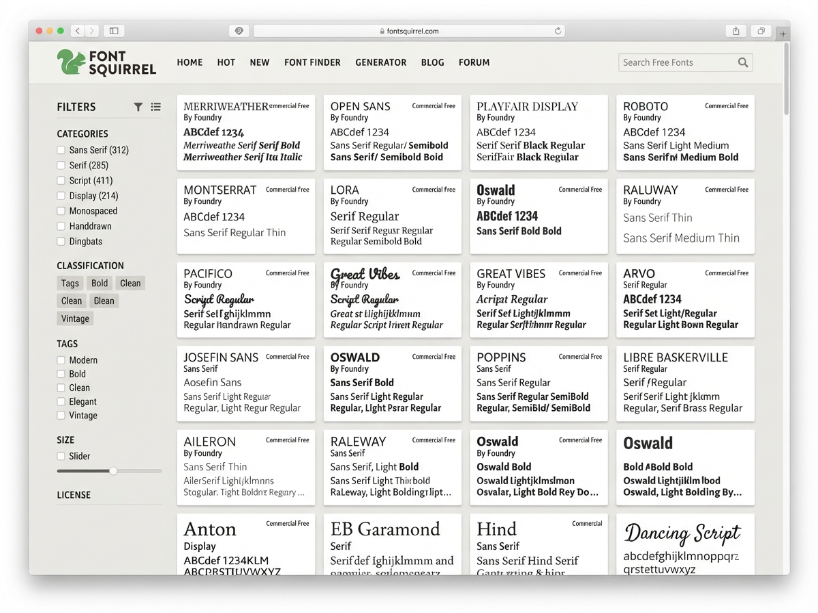
| Font categories | Sans Serif, Serif, Script, Display, Monospace, Slab Serif, Handwritten, Blackletter, Dingbat and more |
| License filter | Filter by Desktop, Webfont, @font-face, App. Each font’s specific license is included with download. |
| Webfont Generator | Free tool. Upload TTF or OTF font, receive WOFF, WOFF2, EOT, SVG output plus @font-face CSS. No registration needed. |
| Font Identifier | Free tool. Upload image, matches font from Font Squirrel, Fontspring and MyFonts databases. |
| Font Matcher | Suggests font pairings based on a selected base font |
| Download format | ZIP file containing TTF, OTF or webfont files plus license document per font |
| Direct hosting | Most fonts download directly from Font Squirrel. Some redirect to the foundry website. |
| Variable fonts | Not supported in the Webfont Generator (current limitation as of 2026) |
| Sister site | Fontspring (fontspring.com): paid premium fonts from the same foundry network |
| Ad blocker note | Font Squirrel relies on ads to sustain operations. Ad blockers may affect site functionality. |
Key Features
Font Squirrel’s defining characteristic is its manual curation policy. As confirmed by the official Font Squirrel FAQ and ManyTools’ 2026 review, every font on the site is hand-picked by the Font Squirrel team rather than accepted through open submission. This is the direct opposite of DaFont’s approach, which accepts submissions from anyone.
The manual curation serves two purposes. First, it filters out low-quality or technically flawed fonts before they reach users. Second, it verifies the commercial-use license of every font before inclusion. As confirmed by LicenseOrg’s font license guide, all fonts on Font Squirrel are free for commercial projects, though individual license terms vary by font. Each downloaded ZIP file includes the specific license document for that typeface.
The library covers all major font categories: Sans Serif (modern, geometric and humanist styles), Serif (traditional, book and transitional), Script (brush, handwritten and calligraphic), Display (decorative and headline styles), Monospace (coding and typewriter styles), Slab Serif, Blackletter, Dingbat and more.
The Webfont Generator
The Webfont Generator is Font Squirrel’s most practical tool for web developers and is available completely free with no account required. As confirmed by Easyweb’s 2026 analysis and the official Font Squirrel FAQ:
1. Upload any TTF or OTF desktop font file (provided you have a license that permits webfont conversion)
2. Choose between Basic, Optimal or Expert subsetting options
3. The generator converts the font into browser-ready formats: WOFF, WOFF2, EOT and SVG
4. Download the complete @font-face kit as a ZIP file, which includes all format variants plus the CSS @font-face declaration ready to paste into your stylesheet
Why this matters: manually converting fonts to web formats and writing @font-face CSS is time-consuming and error-prone. The Webfont Generator automates the entire process in seconds. As confirmed by Easyweb’s 2026 analysis, the output integrates seamlessly with any CMS, WordPress installation or JavaScript framework without additional configuration.
Limitation (2026): the Webfont Generator does not currently support variable fonts. If you are working with variable font files, you will need a separate conversion tool.
Font Identifier
The Font Identifier is a free image-based font recognition tool. Upload a photo or screenshot containing text, and Font Squirrel attempts to match the typeface against its databases of fonts from Font Squirrel, Fontspring and MyFonts. As confirmed by the official Font Squirrel FAQ, this covers a broad search across multiple font libraries beyond just Font Squirrel’s own collection.
Font Identifier is useful for designers who encounter a typeface in the wild (on a packaging, a website screenshot, a logo image) and want to identify it for use in their own work.
Font Matcher
The Font Matcher suggests complementary typeface pairings based on a selected base font. This is useful for designers building typographic systems who need a display font paired with a body font, or a heading font paired with a complementary sans serif.
Advanced Filtering
Fonts can be filtered by category, license type (Desktop, Webfont, @font-face, App), number of fonts in the family, style tags and more. The license filter is particularly useful. Filtering for “Webfont” licenses shows only fonts cleared for use on websites, which removes any ambiguity about which fonts can be embedded directly in web projects.
Font Squirrel vs DaFont: The Key Difference
DaFont is the most common alternative search result when looking for free fonts, so the difference is worth clarifying directly. DaFont accepts open submissions from anyone, which gives it a much larger catalog (46,000+ styles) but means many fonts are not cleared for commercial use. Personal-use-only and unclear licensing are common. Sorting through DaFont for commercial-use fonts requires carefully checking each individual font’s license.
Font Squirrel’s hand-curation eliminates this step entirely. Every font on Font Squirrel is already verified for commercial use. The tradeoff is a smaller library, but the licensing certainty is a meaningful practical advantage for professional designers and commercial projects.
Font Squirrel Pros and Cons
| Pros | Cons |
|---|---|
| Every font is hand-curated and verified for commercial use. No need to check individual licenses. All fonts are cleared for professional commercial projects. | Smaller library than Google Fonts (1,500+ open source) or DaFont (46,000+ styles). Specific or niche typeface categories may have limited coverage. |
| Webfont Generator converts any TTF/OTF to WOFF, WOFF2, EOT and SVG formats with @font-face CSS output. A free tool that replaces paid conversion software for most web projects. | Webfont Generator does not support variable fonts, which are increasingly common in modern type systems. |
| Font Identifier matches uploaded images against Font Squirrel, Fontspring and MyFonts. Useful for identifying fonts seen in the wild. | Some fonts redirect to external foundry websites rather than hosting the download directly on Font Squirrel, which adds a step to the download process. |
| Completely free with no registration required for browsing, downloading or using the Webfont Generator | Ad-supported model. Ad blockers can affect site functionality. The platform displays advertising to sustain free operations. |
| Font Matcher suggests typeface pairings. License filter shows only fonts cleared for specific use cases (Desktop, Webfont, App). | Individual font license terms still vary even though all fonts are free for commercial use. The specific license document in each download ZIP should be reviewed for any unusual restrictions. |
| Fontspring sister site provides a direct upgrade path to premium paid fonts from the same foundry network when the free library does not cover the needed typeface | No variable font support in the library or generator tools as of 2026. The selection of modern variable typefaces is limited compared to Google Fonts. |
Font Squirrel vs the Alternatives
| Font Squirrel | Google Fonts | DaFont | Adobe Fonts | |
|---|---|---|---|---|
| Cost | Free | Free | Free | Included with CC |
| Library size | Curated (smaller) | 1,500+ open source | 46,000+ styles | 20,000+ (CC required) |
| Commercial use guaranteed | Yes (all fonts) | Yes (open source) | Check each font | Yes (with CC) |
| Webfont converter | Yes (free) | No (CDN only) | No | No (CC sync) |
| Font identifier | Yes | No | No | No |
| Best for | Commercial, webfont conversion | Web projects, broad choice | Personal use, volume | Adobe CC users |
15 Notable Free Fonts on Font Squirrel
The fonts below are well-regarded picks from Font Squirrel’s library covering a range of categories. All are free for commercial use.
Montserrat: geometric sans serif with 36 styles. One of the most widely used free fonts on any platform. Clean, modern and versatile for headings, UI and branding.
Bebas Neue: condensed sans serif in five weights (Thin, Light, Book, Regular, Bold). Often called the “Helvetica of free fonts.” Strong choice for headlines and poster design.
Quicksand: geometric sans serif with rounded terminals in seven styles. Excellent legibility on screens at small sizes. Good for UI, app design and body copy.
Pacifico: brush script with a relaxed, hand-lettered feel. Expanded to include Cyrillic in 2017. Best for display, branding and social media graphics.
Exo: futuristic geometric sans serif in 18 styles (9 weights, regular and italic). Works as both a display font and a text font at smaller sizes.
Clarika: geometric sans serif in 11 weights with 200+ Latin-based language support. Available in two style variants: Clarika Geometric and Clarika Grotesque.
Milkshake: thick script font with 650+ glyphs, 10 ligatures and 87 swashes. Bold enough for headlines and strong enough against busy backgrounds.
League Gothic: condensed display font originally designed in 1903, revived as open source. Four styles, 300+ glyphs, multiple language support.
Amatic: handwritten display font best used at larger sizes for titles and headings. Works well on web and desktop at display sizes.
Museo Slab: slab serif with distinct angled details that separate it from traditional serifs. Two free styles available.
Orkney: geometric sans serif with a friendly, bouncy character and sharp-edged details. Four styles: Thin, Regular, Medium, Bold.
Sansation: clean futuristic sans serif in six styles with 500+ glyphs and multilingual support. Designed by Bernd Montag.
Bellefair: elegant single-weight serif in the transitional tradition. Best for luxury branding, editorial and book design.
Caviar Dreams: luxury-inspired sans serif with broad stylistic range. Free for personal and commercial use.
Walkway: nine-style web font from GemFonts. Clean, neutral and well-suited for body copy and website typography.
Note: font availability on Font Squirrel changes over time as the team updates the curated collection. Always verify availability and license at fontsquirrel.com before using in a commercial project.
Who Should Use Font Squirrel?
Font Squirrel serves three groups well. The first is graphic designers who need commercially-licensed fonts quickly without researching each individual font’s terms. The curated collection removes the licensing research step entirely. If it is on Font Squirrel, it is cleared for commercial work.
The second group is web developers who need to convert a desktop font to webfont formats for a client project. The Webfont Generator produces a complete @font-face kit in minutes, which would otherwise require FontForge or paid desktop software and manual CSS writing. As confirmed by Easyweb’s 2026 analysis, the output is compatible with all major browsers and CMS platforms.
The third group is designers who regularly encounter unfamiliar typefaces in reference materials and want to identify them. The Font Identifier tool searches across Font Squirrel, Fontspring and MyFonts in one upload.
For sheer font volume, Google Fonts is the better source with 1,500+ open-source typefaces including variable fonts and a CDN implementation path. For personal-use exploration with maximum choice, DaFont has the deepest catalog. For premium commercial fonts with extended licensing and higher quality, Fontspring (Font Squirrel’s paid sister site) or Adobe Fonts (with Creative Cloud) are the natural next step.
Frequently Asked Questions
Is Font Squirrel free? Yes. Font Squirrel is completely free to use with no subscription, no registration required and no charge for downloading fonts or using the Webfont Generator or Font Identifier tools. The platform is funded by advertising.
Are Font Squirrel fonts safe for commercial use? Yes. As confirmed by LicenseOrg’s font license guide, all fonts featured on Font Squirrel are free for commercial projects. Each font’s specific license document is included in the downloaded ZIP file. Individual fonts may have specific restrictions (such as no modification of the font files), so reviewing the license document in your ZIP is recommended for any commercial project.
What is the Font Squirrel Webfont Generator? The Webfont Generator is a free tool that converts a desktop font file (TTF or OTF) into browser-ready webfont formats including WOFF, WOFF2, EOT and SVG. It also generates the complete @font-face CSS declaration for direct use in a stylesheet. No account or installation is required. Access it at fontsquirrel.com/tools/webfont-generator.
Does Font Squirrel support variable fonts? Not in the Webfont Generator, as of 2026. The Webfont Generator does not support variable font formats. For variable font needs, Google Fonts has a strong and growing collection of variable typefaces available for direct web use via CDN.
What is the difference between Font Squirrel and DaFont? Font Squirrel hand-curates every font for quality and commercial-use licensing. DaFont accepts open submissions and has a much larger catalog, but many DaFont fonts are for personal use only and require individual license checking before commercial use. Font Squirrel is the better choice for commercial work. DaFont has more total options if you are comfortable checking licenses yourself.
What is Fontspring? Fontspring is Font Squirrel’s sister site for premium paid fonts. It is operated by the same team and offers commercial-grade fonts from professional type foundries at per-font prices. If Font Squirrel’s free collection does not cover the specific typeface you need, Fontspring is the logical next step before moving to a subscription service.
Does Font Squirrel host all fonts directly? No. As confirmed by the official Font Squirrel FAQ, some fonts have license restrictions that prevent redistribution by Font Squirrel. In those cases, clicking the download button redirects you to the font foundry’s own website to complete the download. Font Squirrel makes this process as smooth as possible, but it does add one extra step.
Font Squirrel Alternatives Worth Considering
Top free and paid font platforms for designers and developers.
Google Fonts
1,500+ open-source fonts with CDN delivery, variable font support and simple API integration. Best for web projects needing broad typeface choice.
Fontspring
Font Squirrel’s paid sister site. Premium commercial fonts from professional foundries with perpetual licensing. Best for branded typefaces.
Canva
All-round design tool with a built-in font library, templates and AI tools. Best for creators who want fonts within a full design environment.
Iconscout
10.9M+ design assets including fonts, icons, illustrations and Lottie animations. Good one-stop resource for full design asset needs.
Free commercial-use fonts. Webfont Generator. Font Identifier. No account required.
Visit Font Squirrel →
Related: Canva Review | Iconscout Review | Flaticon Review | Vecteezy Review
Sources used in this article: Font Squirrel Official Site (fontsquirrel.com) Font Squirrel Official FAQ (fontsquirrel.com/faq) Font Squirrel Webfont Generator (fontsquirrel.com/tools/webfont-generator) ManyTools: Font Squirrel Review 2026 (manytools.com) Easyweb: Should You Use Font Squirrel in 2025? (easyweb-agency.fr) LicenseOrg: Font Squirrel License Guide (licenseorg.com) FindFree: Font Squirrel (findfree.org)