

Best for: small businesses, marketers, YouTubers and social media creators who need professional-looking intros, outros, logo animations, music visualizers and branded promo videos without design skills.
Pricing: Lite $9.99/mo (annual) or $14.99/mo monthly. Pro $24.99/mo (annual) or $34.99/mo monthly. Business $39.99/mo (annual) or $59.99/mo monthly.
Library: 4,000+ video templates covering intros, outros, promo videos, music visualizers, lyric videos, stream overlays, logo animations and more.
Biggest strength: fast browser-based video creation from professional templates in minutes, with a lifetime commercial license on all exported videos. No software to install.
Main weakness: limited customization (text, colors and images only, no frame-level editing), smaller template library than Motion Array, and reported billing issues around annual auto-renewal without advance notice.
Bottom line: good value for marketers and YouTubers who need branded video assets quickly. Not the right tool if you need full video editing control.
Videobolt is a browser-based video creation platform founded in 2016 and headquartered in Belgrade, Serbia. As reported by Capterra’s June 2026 review data, it is used primarily by small businesses (96% of reviewers) and is particularly popular in the music industry (20% of users) for music visualizers and lyric videos, as well as in marketing and advertising (8%) for branded promo content.
The platform’s core proposition is simple: pick a professionally designed template, customise the text, colors, images and audio, export at up to 4K resolution, and receive a ZIP file containing your MP4 video, a poster image and a lifetime commercial license document. No software download, no design skills, no long timeline. As reported by GetApp’s 2026 user reviews, most users describe completing a project from idea to exported video in under 30 minutes.
Table of Contents
How We Researched This Review
Pricing verification: all plan prices and features verified from videobolt.net/pricing (the official source). Third-party aggregators show inconsistent pricing because they cache old data. The official pricing page is the authoritative source.
Billing warning: the annual auto-renewal complaint verified from multiple independent Capterra user reviews (June 2026).
Feature verification: Adobe Extension availability on Pro plan and above, and Brand Kit feature, confirmed from the official Videobolt pricing page.
| Detail | Information |
|---|---|
| Founded | 2016, Belgrade, Serbia |
| Template library | 4,000+ customizable video templates |
| Template categories | Intros, outros, logo animations, promo videos, music visualizers, lyric videos, stream overlays, slideshow maker, corporate videos, social media stories, video ads |
| Stock media | 1M+ stock photos, videos and audio via Unsplash, Pixabay and Pexels integrations |
| Export formats | MP4 (up to 4K UHD, up to 60fps). ProRes 4444 on Business plan. ZIP with license document. |
| Lite plan | $9.99/mo (annual) or $14.99/mo monthly. Up to 10 min video, 20GB storage, HD. |
| Pro plan | $24.99/mo (annual) or $34.99/mo monthly. Up to 1 hour, 60GB, 4K, Adobe extension, 1 Brand Kit. |
| Business plan | $39.99/mo (annual) or $59.99/mo monthly. ProRes exports, unlimited Brand Kits, resale license. |
| Free plan | Yes, with watermarked exports. A free trial of the paid plan is available. |
| Commercial license | Lifetime commercial license included with every exported video on all paid plans |
| Resale license | Business plan only. Allows selling exported videos to clients. |
| Adobe integration | Pro plan and above. Access Videobolt assets inside After Effects and Premiere Pro. |
| App | Browser-based only. No desktop or mobile app required. |
| Affiliate programme | Yes, route via ThirstyAffiliates |
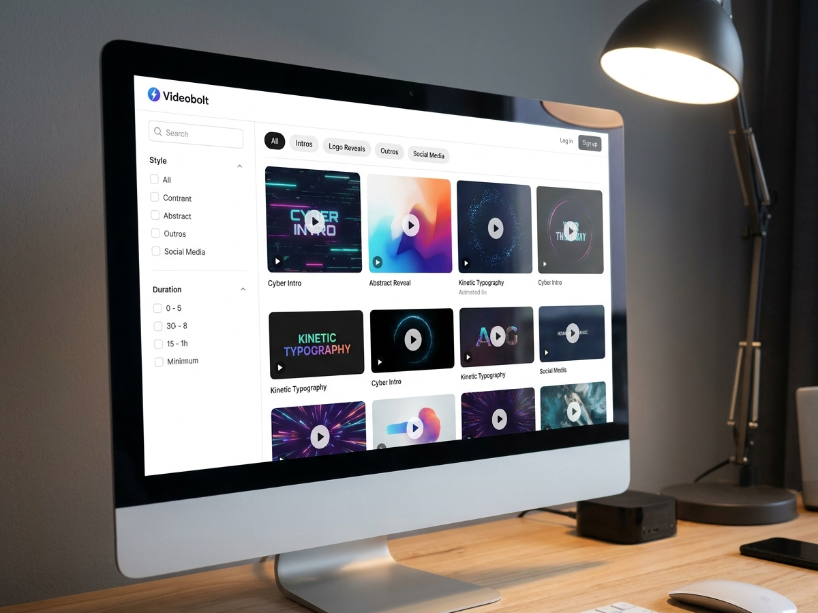
Templates: What 4,000+ Actually Covers
The 4,000+ template library is organized into categories based on use case:
- Intros and outros: channel openers and closers for YouTube and social video, the most-used category on the platform
- Logo animations: animated logo reveals for branding and video sign-offs
- Music visualizers: audio-reactive waveform and spectrum animations, popular with musicians and podcasters
- Lyric videos: text-driven music video templates. <cite index=”25-1″>Subscribers can export music visualizers and lyric videos of up to 2 hours in length</cite>
- Stream overlays: starting soon screens, BRB screens, Twitch and YouTube Live overlays for streamers
- Promo videos: product and service promotional templates for social and web
- Social media stories: vertical format templates for Instagram, TikTok and Facebook Stories
- Corporate videos: professional presentation and explainer video templates
- Slideshow maker: photo slideshow and portfolio templates
- Video ads: short-form ad templates for paid social campaigns
Each template is customizable within set parameters: you can change text, colors, images, logos and audio. You cannot edit the underlying animation, timing or layout independently. This is the core limitation of the platform: it is a template customizer, not a timeline editor.
Search and filters cover video type, genre, duration, style, format, resolution and industry. As noted in GetApp user reviews, the search works adequately for most users but can take time to find a very specific style.
Features Worth Knowing
Text overlays: multiple text elements, font choices including all Google Fonts, and custom font upload via the media library.
Brand overlay: upload your own logo and images to the media library or choose from the integrated Unsplash, Pixabay and Pexels stock libraries for brand identity overlays.
Audio tools: upload your own audio file or choose tracks directly from Soundcloud or Epidemic Sound. All template default audio is covered by the video license.
Media library: cloud storage for all uploaded files (images, logos, fonts, music). Files saved here can be reused across multiple projects without re-uploading.
Adobe Extension (Pro and Business only): <cite index=”25-1″>the Pro plan unlocks an Adobe Extension that allows you to instantly access your videos from inside After Effects and Premiere Pro</cite>, removing the need to switch browser windows during a professional edit.
Brand Kit (Pro: 1 kit, Business: unlimited): applies brand colors to any video template with one click</cite>. Useful for agencies and marketers producing branded content at volume.
Social sharing: direct publish to YouTube, Twitter, Facebook and LinkedIn from the platform.
Pricing: Three Plans Explained
| Plan | Annual price | Monthly price | Key limits and extras |
|---|---|---|---|
| Free | $0 | $0 | Watermarked exports. Full template preview. Good for testing before subscribing. |
| Lite | $9.99/mo | $14.99/mo | HD exports. Up to 10 min video duration. 20GB cloud storage. Commercial license. No Adobe extension. |
| Pro | $24.99/mo | $34.99/mo | 4K exports. Up to 1 hour video duration. 60GB cloud storage. Adobe extension (AE + Premiere Pro). 1 Brand Kit. Commercial license. |
| Business | $39.99/mo | $59.99/mo | ProRes 4444 exports. 4K. 100GB cloud storage. Unlimited Brand Kits. Resale license (sell exports to clients). Adobe extension. |
Videobolt Pros and Cons
| Pros | Cons |
|---|---|
| Browser-based, no software to install. Works on any device including phones and tablets. | Customization limited to text, colors and images. No frame-level or timing control. |
| Lifetime commercial license included with every export on all paid plans | Annual auto-renewal with no advance email warning, and refund complaints reported by multiple users |
| 4K exports up to 60fps, ProRes on Business plan, good quality output for the price | 4,000+ templates is smaller than Motion Array (2M+ assets) or Placeit (85,000+ templates) |
| Adobe extension on Pro plan for After Effects and Premiere Pro integration | Customer support quality is mixed, with some users reporting slow resolution and unhelpful responses on billing issues |
| Music visualizer templates up to 2 hours duration, good for musicians and podcasters | Rendering can be slow on complex templates, especially during peak hours |
| Resale license on Business plan lets agencies sell exported videos directly to clients | Free plan watermarks are visible and the plan is not usable for professional output |
Videobolt vs the Alternatives
| Videobolt | Placeit | Canva | Motion Array | |
|---|---|---|---|---|
| Starting paid price | $9.99/mo (annual) | $7.47/mo (annual) | $15/mo | $15.99/mo (annual) |
| Template focus | Animated video templates | Mockups, logos, video | All-round design | AE, Premiere, DaVinci templates |
| Music visualizers | Yes (up to 2 hours) | No | No | No |
| 4K export | Yes (Pro+) | No | Limited | Yes |
| Lifetime commercial license | Yes | Yes | Yes (subject to plan) | Active sub required |
| Best for | Video intros, music visualizers | Mockups, logos, POD | General design | NLE template editors |
For a fuller comparison see our Placeit review, Canva review and Motion Array review.
Who Should Use Videobolt?
Videobolt fits specific use cases well. For YouTubers who need professional intros, outros and animated branding elements without learning After Effects or Premiere Pro, Videobolt’s template approach produces good-quality results quickly.
For musicians and podcasters, the music visualizer templates up to 2 hours duration cover a use case that most competing platforms do not address specifically. Lyric video makers are similarly rare at this price point.
For streamers, the Twitch and YouTube Live overlay templates (starting soon, BRB, scenes) are straightforward to set up without Photoshop or vector editing skills.
For agencies needing to resell video content to clients, the Business plan’s resale license is one of the few in this category that permits direct client resale rather than just commercial use.
Videobolt is not the right tool for creators who need full timeline editing control, complex motion graphics from scratch, or a broad stock asset library. For NLE-specific templates and a large asset library, see our Motion Array review. For all-round graphic design, see our Canva review.
Frequently Asked Questions
Is Videobolt free? Videobolt has a free plan with watermarked exports and full template preview access. A paid trial is available. Paid plans start at $9.99 a month on annual billing or $14.99 a month on monthly billing. Verify current pricing at videobolt.net/pricing.
How much does Videobolt cost? The Lite plan is $9.99 a month on annual billing or $14.99 a month on monthly billing. The Pro plan is $24.99 a month (annual) or $34.99 a month (monthly). The Business plan is $39.99 a month (annual) or $59.99 a month (monthly). Annual billing saves around 33% and is recommended if you plan to use the platform regularly.
Does Videobolt have a commercial license? Yes. As confirmed by the official Videobolt pricing page, all videos exported on paid plans come with a lifetime commercial license, including the template audio and any stock assets from Unsplash, Pixabay and Pexels used in the project.
What is the Videobolt resale license? The Business plan includes an additional resale license that permits you to sell your exported videos directly to clients or third parties. As confirmed by the official Videobolt pricing page, this license is exclusive to the Business plan, and selling videos on other plans may cause account suspension.
Can I use Videobolt inside Adobe Premiere Pro or After Effects? Yes, but only on the Pro and Business plans. The Adobe extension gives access to your Videobolt assets from inside After Effects and Premiere Pro. The Lite plan does not include the extension.
What happens if I cancel Videobolt? As confirmed by the official Videobolt cancellation policy, you retain full access to your projects and drafts until the current subscription period ends. Downloaded videos remain yours permanently under the commercial license. To cancel, visit the Billing page in your account and click Cancel Subscription. Set a calendar reminder before your annual renewal date as Videobolt does not send advance renewal warnings.
Videobolt Alternatives Worth Considering
Reviewed by our team. Read the full review or head straight to the platform.
Placeit
85,000+ mockups, logo templates and video templates. Best for print on demand and branded mockups at $7.47/mo annual.
Canva
All-round design tool with video templates, social media posts and AI tools. Better for general design from $15/mo.
Motion Array
2M+ assets including After Effects, Premiere Pro and DaVinci templates. Better for NLE editors from $15.99/mo annual.
VEED.io
Browser video editor with subtitles, transcription, AI tools and social media publishing. More editing control than Videobolt.
Lite plan from $9.99/mo annual. Free plan available. Lifetime commercial license on all exports.
Visit Videobolt →
Related: Best AI Design Tools | Placeit Review | Canva Review | Motion Array Review | VEED.io Review
Sources used in this article: Videobolt Official Pricing Page (videobolt.net/pricing) Capterra: Videobolt Reviews and Pricing, June 2026 (capterra.com) GetApp: Videobolt Reviews and Features 2026 (getapp.com) G2: Videobolt Pricing 2026 (g2.com)