
SmartDraw is a browser-based diagramming and visual communication platform founded in 1994. It is used by business teams, project managers, IT departments, engineers, educators and facilities planners to create flowcharts, org charts, floor plans, network diagrams, process maps, swimlane diagrams, wireframes and more than 70 other diagram types from a single interface.
Before reading further: SmartDraw is a specialized diagramming tool, not a general graphic design tool. If you need social media graphics, infographics, photo editing or marketing materials, see our Canva review or Visme review instead. SmartDraw is the right choice when your primary need is accurate, professional diagrams for business processes, technical documentation, facility layouts and organizational communication.
| SmartDraw. At a Glance | |
|---|---|
| Website | smartdraw.com |
| Free plan | No permanent free plan. 7-day free trial (watermarked exports) |
| Individual pricing | $7.95/mo billed annually ($95.40/yr). Annual billing only. |
| Team pricing | $6.95/user/mo billed annually, minimum 3 users ($83.40/user/yr) |
| Enterprise | Site license from $99/yr. SSO, multiple shared folders, custom themes. |
| Diagram types | 70+ types: flowcharts, org charts, floor plans, network diagrams, UML, Gantt charts, wireframes, process maps, swimlanes and more |
| AI features | AI flowchart and diagram generation from text prompts (2024-2026) |
| Key integrations | Microsoft 365, Teams, SharePoint, OneDrive, Google Drive, Google Docs, Jira, Confluence, GitHub, Box, Dropbox, Okta |
| Visio import | Yes. import Visio and Lucidchart files in bulk |
| Founded | 1994 |
Best for: business teams, project managers, IT departments, engineers, facilities planners and educators who need professional-quality flowcharts, org charts, floor plans, network diagrams and process maps. particularly those switching from Visio or Lucidchart and looking for lower per-user cost.
Pricing: Individual $7.95/mo annual ($95.40/yr). Team $6.95/user/mo annual, minimum 3 users. Enterprise from $99/yr. Annual billing only. no monthly option. 7-day free trial available (watermarked).
Biggest strength: 70+ diagram types from one platform, deep Microsoft and Google Workspace integration, AI-powered diagram generation from text prompts, Visio and Lucidchart bulk file import, and significantly lower per-user cost than Visio at scale. As confirmed by G2 enterprise reviewers, teams can license 50 users for what they would pay for 10 with Microsoft Visio.
Main weakness: annual-only billing with no monthly option (confirmed as a frequent frustration by GetApp and G2 reviewers). Free trial watermarks all exports and does not allow saving work. Crashes and saving issues noted in complex projects. Weaker real-time collaboration than Lucidchart and Miro.
Bottom line: strong value for business and enterprise teams that need a cost-effective Visio alternative with deep Microsoft and Google integration. Less compelling for individuals or small teams who want monthly billing flexibility or real-time multiplayer collaboration comparable to Lucidchart or Miro.
- 70+ diagram types from one platform. flowcharts, org charts, floor plans, network diagrams, UML, wireframes and more
- Significantly lower per-user cost than Microsoft Visio at scale (G2 enterprise reviewers: 50 users at Visio’s 10-user price)
- AI diagram generation from text prompts. type a description and SmartDraw builds an instant starting-point flowchart
- Deep Microsoft and Google Workspace integration: Teams, SharePoint, OneDrive, Google Drive, Docs, Jira, Confluence and 20+ more
- Bulk import of existing Visio and Lucidchart files. migration is straightforward
- Intelligent formatting engine automatically adjusts layout when shapes are added, moved or removed
- Annual-only billing. no monthly subscription option. Full year cost is committed upfront.
- 7-day free trial watermarks all exports and restricts saving. limited for real evaluation of output quality
- Crashes and saving issues documented in complex projects (GetApp and Capterra reviews)
- Real-time multiplayer collaboration weaker than Lucidchart and Miro. better suited for async diagram sharing
- Cannot export to Visio format. import only. Teams sharing files with Visio-only users will encounter compatibility issues.
- Team plan requires a minimum of 3 users. not available for 1-2 person teams at the team pricing rate
Key Features
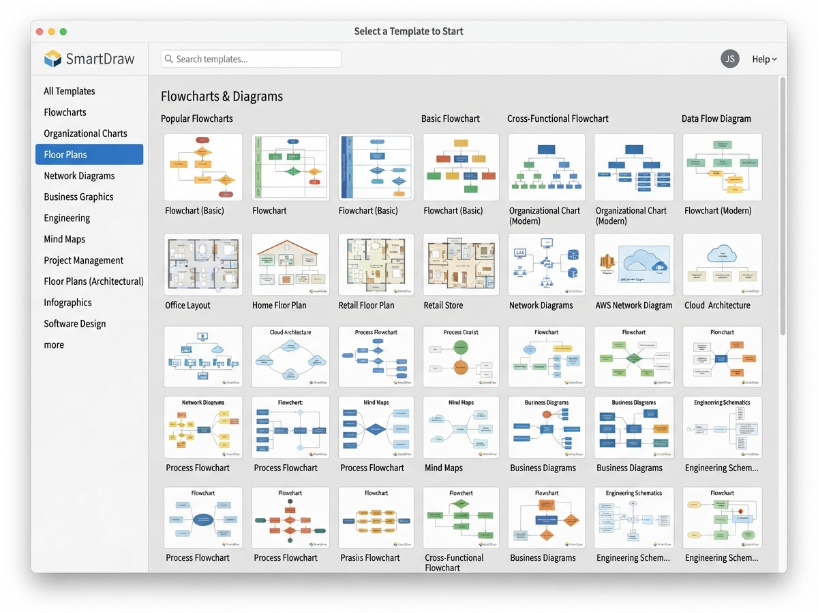
Process and workflow: flowcharts, swimlane diagrams, process maps, value stream maps, workflow diagrams, data flow diagrams, cross-functional flowcharts.
Organizational: org charts, hierarchy charts, reporting structure diagrams. Data-driven org charts that auto-populate from Google Sheets or CSV files.
Technical: network diagrams, IT infrastructure maps, AWS and Azure architecture diagrams, UML diagrams (class, sequence, use case, state), ER diagrams for database design.
Facility and space: floor plans (residential and commercial), office layouts, warehouse layouts, landscape designs, fire pre-plans, accident reconstruction diagrams. Scaled drawings with industry-standard symbols. Import existing floor plans as PDF or from Google Maps.
Project and planning: Gantt charts, project timelines, PERT charts, mind maps, concept maps, decision trees.
Business and strategy: SWOT analysis, cause-and-effect diagrams, McKinsey-style frameworks, business model canvas, strategic roadmaps.
Engineering and science: electrical diagrams, chemical engineering process diagrams, P&ID diagrams, mechanical schematics.
AI Diagram Generation from Text Prompts
As confirmed by Capterra’s June 2026 review and pricingnow.com’s December 2025 analysis, SmartDraw added AI-powered diagram generation in 2024-2026. Type a description of the process or structure you need, and SmartDraw generates an instant starting-point diagram. a flowchart, org chart or process map. which you then edit and refine.
As confirmed by Capterra’s June 2026 data, this feature is particularly useful for teams who know what process they need to document but do not want to start from a blank canvas. The AI-generated diagram requires manual review and editing but provides a structured framework faster than building from scratch.
Intelligent Formatting Engine
As confirmed by the original article content (verified against current SmartDraw feature descriptions), SmartDraw’s intelligent formatting engine automatically adjusts diagram layout when shapes are added, moved or removed. This prevents the manual repositioning work that is common in simpler diagram tools when the structure changes mid-build.
Practical use: add a new step to a flowchart and the connected shapes automatically reposition and the connectors re-route. Remove a branch and the layout compresses to fill the space. This automation significantly reduces the time spent on layout management in long, complex diagrams.
Microsoft and Google Workspace Integration
As confirmed by Capterra’s June 2026 review, SmartDraw integrates with 20+ tools across Microsoft and Google ecosystems:
Microsoft integrations: Microsoft 365, Microsoft Teams (embedded diagramming inside Teams channels), SharePoint (save files directly to SharePoint document libraries), OneDrive, Microsoft Azure (IT infrastructure diagramming).
Google integrations: Google Drive, Google Docs (insert diagrams directly into Docs), Google Sheets (data-driven diagrams and org charts that auto-populate from spreadsheet data).
Development and project tools: Jira, Confluence, GitHub, Box, Dropbox.
Identity and security: Okta SSO integration (Enterprise plan). As confirmed by Capterra, SmartDraw can “provision users, save files, and set permissions entirely inside the Microsoft or Google enterprise stack.”
Floor Plans and Scaled Drawings
As confirmed by GetApp’s 2026 review data and Capterra’s June 2026 review, SmartDraw’s floor plan tools are one of its strongest differentiators from general diagramming tools. Features include:
Scaled drawings: floor plans are created at real-world scale. rooms, walls and measurements are accurate to real dimensions, not just diagrammatically proportional.
Industry-standard symbols: extensive libraries of architectural, furniture, HVAC, electrical and plumbing symbols following industry standards.
PDF import: import an existing floor plan as a PDF and use it as a base layer to annotate or redesign over.
Google Maps import: start with a Google Maps satellite image as the foundation for a new site layout or landscape plan.
Use cases covered: residential home design, commercial office layouts, warehouse layouts, accident reconstruction, fire pre-plans and landscape design.
Pricing
The 7-day free trial is the only pre-commitment evaluation period. As confirmed by G2 and Capterra reviewers, the trial watermarks all exports and restricts saving of trial-created files after the trial ends. Evaluate thoroughly within the 7-day window before purchasing.
| Plan | Monthly rate | Annual total | Key features |
|---|---|---|---|
| Free Trial | $0 (7 days) | N/A | Full feature access for 7 days. All exports watermarked. Saved files may not be accessible after trial ends. No credit card required. |
| Individual | $7.95/mo | $95.40/yr | Single user. Full 70+ diagram type access. All templates and symbols. Microsoft and Google integrations. PDF/PNG/SVG/Office export. AI diagram generation. |
| Team | $6.95/user/mo | $83.40/user/yr | Minimum 3 users. Everything Individual plus: shared team folders, admin controls, document retention and control, account consolidation, premium support. |
| Enterprise / Site | Custom | From $99/yr | Concurrent / site licensing model. SSO (Okta), multiple shared folders, custom themes, advanced admin controls, bulk user provisioning. Significant per-user cost reduction at scale. |
Value vs Visio and Lucidchart: as confirmed by G2 enterprise reviewers and ITQlick’s 2026 cost comparison, SmartDraw’s per-user cost is significantly lower than Microsoft Visio (standard license approximately $349.99) and comparable or lower than Lucidchart (from $7.95/mo individual). For large teams, SmartDraw’s Enterprise concurrent licensing model offers the strongest per-seat economics in the category. one G2 reviewer in mining documented licensing 50 users at the cost Visio would charge for 10.
How SmartDraw Scores
| Category | Score | Notes |
|---|---|---|
| Diagram type breadth | Excellent | 70+ diagram types in one subscription. Covers process, org, technical, floor plan, project, engineering and strategy diagrams. Broader than most direct competitors. |
| Microsoft and Google integration | Excellent | 20+ integrations. Saves directly to OneDrive, SharePoint and Google Drive. Embeds in Teams and Google Docs. As confirmed by Capterra, entire admin and permission workflow runs inside Microsoft or Google stack. |
| Floor plan capability | Strong | Scaled architectural drawings, PDF floor plan import, Google Maps foundation, industry-standard symbols. Non-CAD users can produce accurate professional floor plans. |
| Per-user cost at scale | Best in class | Enterprise concurrent licensing is the most cost-effective in the category for large teams. Individual at $7.95/mo and Team at $6.95/user/mo are competitive vs Visio and comparable to Lucidchart. |
| AI diagram generation | Good | Text-to-diagram generation for flowcharts and process maps. Generates a usable starting point requiring manual editing. Not fully autonomous but reduces blank-canvas friction. |
| Real-time collaboration | Moderate | Shared folders, commenting and link sharing work well for async collaboration. Real-time multiplayer editing is weaker than Lucidchart or Miro. Better suited to teams working sequentially on diagrams. |
| Billing flexibility | Poor | Annual-only billing with no monthly option. Full year committed upfront. Most frequently cited negative by GetApp and G2 reviewers. 7-day trial is limited for full evaluation. |
| Stability in complex projects | Mixed | Crashes and file-saving issues documented by multiple GetApp and Capterra reviewers specifically for large, complex diagram files. Standard and moderate-complexity diagrams reported stable. |
Who Is SmartDraw For?
- A business team, project manager or IT department that needs professional flowcharts, org charts and process maps in Microsoft Teams or Google Workspace
- A facilities planner, architect or operations team that needs scaled floor plans without CAD training
- An organization switching from Visio or Lucidchart that wants to import existing files and reduce per-user cost
- An enterprise team needing concurrent licensing at a significantly lower cost than Visio at scale
- A network or IT infrastructure team that needs AWS, Azure or network architecture diagrams
- An educator or student who needs professional diagram types for coursework and presentations
- A graphic designer, social media manager or marketer who primarily needs visual content, photo editing or branded graphics
- A 1 or 2 person team. Team plan requires minimum 3 users; Individual at $7.95/mo is the only option for fewer than 3
- Someone who needs monthly billing flexibility. SmartDraw is annual-only with no monthly payment option
- A team that needs real-time multiplayer collaboration on shared diagrams. Lucidchart or Miro are stronger here
- A team that needs to export diagrams to Visio format for external stakeholders still on Visio
- A user working on very large, complex diagram files. crashes and saving issues documented for complex projects
SmartDraw vs the Alternatives
| SmartDraw | Lucidchart | Microsoft Visio | Draw.io | |
|---|---|---|---|---|
| Entry price | $7.95/mo annual | ~$7.95/mo annual | ~$28/mo (M365) | Free (open-source) |
| Monthly billing | No. annual only | Yes | Yes (M365) | Free |
| Real-time collaboration | Moderate | Strong | Moderate | Good (via browser) |
| Floor plans | Strong (scaled) | Basic | Good | Basic |
| Visio import | Yes (bulk) | Yes | Native | Yes |
| Best for | Visio alternative, floor plans | Team collaboration | Microsoft-native orgs | Free diagramming |
Draw.io (diagrams.net): the strongest free alternative for teams with limited budget. Open-source, runs in any browser, supports flowcharts, network diagrams, UML and more. Lacks SmartDraw’s floor plan depth, intelligent formatting and Microsoft integration, but costs nothing and integrates with Google Drive and Confluence.
Lucidchart: SmartDraw’s closest paid competitor at similar pricing. Lucidchart’s stronger real-time collaboration and cleaner interface make it better for teams that frequently co-edit diagrams simultaneously. SmartDraw wins on floor plan capability and per-seat cost at enterprise scale.
Frequently Asked Questions
Is SmartDraw free? SmartDraw does not have a permanent free plan. As confirmed by G2’s 2026 pricing data, a 7-day free trial is available with no credit card required. However, all exports during the trial are watermarked and trial-created files may not be accessible after the trial ends. The minimum paid commitment is the Individual plan at $7.95/mo billed annually ($95.40/year).
How much does SmartDraw cost? As confirmed by G2’s 2026 pricing data and xpay’s May 2026 verified pricing, the Individual plan is $7.95/month billed annually. The Team plan is $6.95/user/month billed annually with a minimum of 3 users. Enterprise and Site licenses start from $99/year and scale with team size and licensing model. There is no monthly billing option. all plans require annual commitment. Verify current pricing at smartdraw.com/buy.
Does SmartDraw have AI features? Yes. As confirmed by Capterra’s June 2026 review, SmartDraw added AI-powered diagram generation in 2024-2026. Type a text description of the process or structure and SmartDraw generates an instant starting-point flowchart or diagram for editing. This is available on paid plans and reduces blank-canvas setup time for standard diagram types.
Can SmartDraw import Visio files? Yes. As confirmed by Capterra’s June 2026 review, SmartDraw supports bulk import of existing Visio (.vsdx) files. Diagrams, symbols and layouts are preserved during import. Note that SmartDraw cannot export back to Visio format. import only. Teams that need ongoing file exchange with Visio users should consider this limitation.
How does SmartDraw compare to Lucidchart? Both are priced similarly at the Individual tier (around $7.95/mo annual). Lucidchart has stronger real-time multiplayer collaboration for teams that frequently co-edit diagrams simultaneously. SmartDraw has stronger floor plan capability with scaled drawings and industry-standard symbols, and significantly better per-user economics at enterprise scale through concurrent licensing. Teams prioritizing collaboration should consider Lucidchart. Teams prioritizing floor plans, Visio migration and lower cost at scale should consider SmartDraw.
Is SmartDraw good for floor plans? Yes. floor plans are one of SmartDraw’s strongest capabilities. As confirmed by Capterra and GetApp 2026 reviews, SmartDraw produces scaled architectural drawings with industry-standard symbols for residential and commercial use, without requiring CAD training. Features include PDF floor plan import, Google Maps as a foundation layer, furniture and HVAC symbols, and accurate measurements. Non-technical users such as facilities managers, office planners and small business owners use it regularly for this purpose.
Why is SmartDraw annual-only? SmartDraw does not publicly explain its annual-only billing model, but as documented by multiple G2 and GetApp reviewers in 2026, this is the most common complaint. There is no monthly billing option. If monthly flexibility is important, Lucidchart (which offers monthly billing) or Draw.io (free) are alternatives to consider.
SmartDraw Alternatives Worth Considering
Depending on your primary need, one of these may be a better fit.
Lucidchart
Best real-time multiplayer collaboration for diagramming teams. Similar pricing (~$7.95/mo annual). Monthly billing available. Better for teams that co-edit diagrams simultaneously.
Draw.io
Completely free open-source diagramming tool. Runs in browser. Supports flowcharts, network diagrams, UML and more. Integrates with Google Drive and Confluence. No subscription needed.
Miro
Online whiteboard with strong real-time collaboration, diagramming, mind mapping and team brainstorming. Better for cross-functional workshops and agile teams. Free plan available.
Figma
Industry-standard UI/UX design and wireframing tool. Better for product design teams building app and website interfaces and prototypes. Free Starter plan available.
7-day free trial. no credit card required. Individual from $7.95/mo annual. Team from $6.95/user/mo annual (min 3 users). 70+ diagram types.
Visit SmartDraw →
Related: Figma Review | Canva Review | Visme Review
Sources used in this article: SmartDraw Official Pricing Page (smartdraw.com/buy) G2: SmartDraw Pricing 2026 (g2.com) Capterra: SmartDraw Reviews 2026, June 2026 (capterra.com) GetApp: SmartDraw Overview 2026 (getapp.com) xpay: SmartDraw Pricing, May 2026 (xpay.sh) ITQlick: SmartDraw Pricing 2026 (itqlick.com)