

Best for: beginners, YouTubers, small business owners, educators and content creators who need a capable desktop video editor with AI tools (auto-subtitles, background removal, noise reduction) without the complexity of DaVinci Resolve or the cost of Adobe Premiere Pro.
Pricing: Video Editor $15.95/mo or $54.95/yr. Video Editor Plus Lifetime $69.95 one-time. Video Suite $29.95/mo or $84.95/yr. Video Suite + Photo Editor $99.95/yr or $149.95 lifetime. 7-day free trial (watermarked). 14-day money-back guarantee on purchase.
Biggest strength: AI-powered tools that actually work at this price point: one-click background removal (no green screen needed), automatic subtitles in 13 languages, AI noise reduction and motion tracking, all included across plans.
Main weakness: not suitable for advanced professional work (no multi-cam editing, limited color grading). The “lifetime” license only covers the current major version. Future version upgrades cost $20 to $40 extra. The Movavi Effects trial auto-renews at $49.95/mo if not cancelled.
Bottom line: the Video Editor annual plan at $54.95/yr or the lifetime Video Editor Plus at $69.95 are excellent value for the target audience. If you are a professional editor, DaVinci Resolve Free is better. If you need a browser-based editor, VEED.io is a closer comparison.
Movavi is a multimedia software company founded in 2004, headquartered in Cyprus. As reported by AmpiFire’s May 2026 review, it serves over 5 million users in 150 countries and offers a full suite of desktop applications for Windows and Mac including a video editor, screen recorder, video converter, photo editor and slideshow maker. Unlike browser-based tools such as VEED.io or Canva, Movavi is installed desktop software, which means it works offline and can handle larger files and longer timelines without browser performance limitations.
The platform has undergone significant changes since earlier versions of this article. Pricing has been restructured, AI tools have been substantially expanded, and the product lineup has been reorganised into clearer tiers. This review covers the 2026 product structure and the billing warnings that earlier reviews missed.
Table of Contents
How We Researched This Review
Pricing verification: Video Editor ($15.95/mo, $54.95/yr), Video Editor Plus Lifetime ($69.95), Video Suite ($29.95/mo, $84.95/yr) and Video Suite + Photo Editor ($99.95/yr, $149.95 lifetime) confirmed from AI Video Picks (May 2026), Elite Content Marketer (April 2026) and PulseSignal (March 2026), all citing the official Movavi store.
Lifetime upgrade fee warning: confirmed from FluxNote’s April 2026 pricing analysis, which notes future major version upgrades typically cost $20 to $40 extra per cycle.
Effects trial auto-renewal: confirmed from PulseSignal’s March 2026 pricing breakdown.
AI tools: auto-subtitles (13 languages), AI background removal, noise reduction and motion tracking confirmed from AI Video Picks’ May 2026 hands-on review.
Money-back guarantee: 14-day confirmed from Elite Content Marketer’s April 2026 review. Note: this is different from the 7-day free trial period.
Movavi at a Glance
| Detail | Information |
|---|---|
| Founded | 2004. Headquartered in Cyprus. 5M+ users in 150 countries. |
| Platform | Desktop software for Windows and Mac. Not browser-based. Works offline. |
| Video Editor | $15.95/mo or $54.95/yr. Full AI tools. All core editing features. |
| Video Editor Plus (Lifetime) | $69.95 one-time. Same core features. Subject to upgrade fee for future major versions. |
| Video Suite | $29.95/mo or $84.95/yr. Video editor + screen recorder + video converter + Movavi Effects. |
| Video Suite Plus | $94.95/yr. Video Suite + three bonus effects packs. |
| Video Suite + Photo Editor | $99.95/yr or $149.95 lifetime. Adds full AI photo editor to the suite. |
| Movavi Unlimited | ~$99.95/yr or ~$259.95 lifetime. All 9 Movavi products in one bundle. |
| Free trial | 7-day free trial. All features included. Exports carry a visible watermark. |
| Money-back guarantee | 14 days from purchase. Check eligibility at movavi.com/refund-policy. |
| AI tools included | Auto-subtitles (13 languages), AI background removal (no green screen), noise reduction, motion tracking, AI upscaling, smart object detection |
| Languages supported | 14 interface languages. Auto-subtitles in 13 languages. |
| OS | Windows 10/11 and macOS 11.0 (Big Sur) and above |
| Export formats | MP4, MOV, AVI, MKV, WebM, GIF and more. 4K export supported. |
| Affiliate programme | Yes, route via ThirstyAffiliates |
Key Features
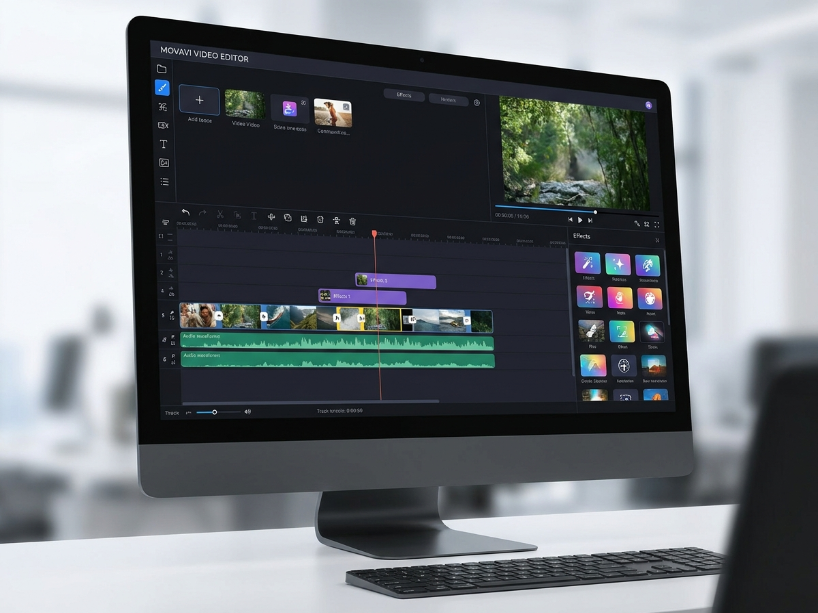
Timeline editing uses a multi-track drag-and-drop interface that most users can start using in minutes. As reported by AmpiFire’s May 2026 review, the timeline is accessible for beginners without prior editing experience, while offering enough layers and track management for intermediate workflows. Core editing operations including trim, split, crop, rotate, cut and speed adjustment are all available in the main editor.
AI background removal removes video backgrounds without a green screen. As confirmed by AI Video Picks’ May 2026 hands-on review, this is one of Movavi’s standout features for talking-head video creators who do not have a dedicated filming setup. Performance is good on clean footage with reasonable contrast between subject and background.
Auto-subtitles (13 languages) generate accurate subtitle tracks from spoken audio automatically. As confirmed by AI Video Picks’ May 2026 review, accuracy is strong for clear speech and the subtitles are fully editable before export. Supported languages include English, Spanish, French, German, Italian, Portuguese, Russian, Polish, Chinese, Japanese and others.
AI noise reduction cleans up background noise and room reverb from recorded audio in one click, useful for content creators working in non-studio environments.
Motion tracking lets you attach graphics, text or effects to a moving object in the video so they follow the object through the clip automatically.
AI upscaling improves the resolution and sharpness of lower-quality footage, useful for older recordings or content captured at lower resolutions.
Transitions and effects cover hundreds of animated transitions, filters, color presets, stickers, lower thirds and text animations. Additional effects packs are available through Movavi Effects Store.
Screen recorder is included in all Video Suite plans. Captures full screen, selected area, webcam or both simultaneously, with audio from system and microphone. Useful for tutorial and online course creators.
Video converter (Suite plans) supports 180+ formats including MP4, MOV, AVI, MKV, WebM, DVD and more with batch conversion.
Photo editor (Video Suite + Photo Editor and Unlimited plans) includes AI background replacement, object removal, photo colorization, portrait retouching and color correction presets.
1. The “Lifetime” version upgrade fee: as reported by FluxNote’s April 2026 pricing analysis, Movavi’s one-time “lifetime” licenses cover only the current major version of the software. When Movavi releases the next major version (e.g., from 2026 to 2027), users on a lifetime license are typically charged an upgrade fee of $20 to $40 to access the new version. This means a “lifetime” license is not a permanent free upgrade for all future versions, and the cumulative cost over several years can exceed an annual subscription. If you buy a lifetime license, check movavi.com for the current major version upgrade policy before purchasing.
2. Movavi Effects trial auto-renewal: as confirmed by PulseSignal’s March 2026 pricing breakdown, the Movavi Effects (additional effects packs) include a 7-day free trial that auto-renews at $49.95/mo if not cancelled before the trial ends. If you activate an Effects trial alongside your main product purchase, set a reminder to cancel before day 7 if you do not want to continue the Effects subscription.
Movavi Pricing: Full Breakdown
| Product | Monthly | Annual | Lifetime | What is included |
|---|---|---|---|---|
| Video Editor | $15.95/mo | $54.95/yr | N/A | Full timeline editor, all AI tools, transitions, effects, 4K export. Windows and Mac. |
| Video Editor Plus | N/A | N/A | $69.95 | Same core editor features as annual. One-time purchase. Subject to upgrade fee for next major version. |
| Video Suite | $29.95/mo | $84.95/yr | N/A | Video editor + screen recorder + video converter + Movavi Effects full access. |
| Video Suite Plus | N/A | $94.95/yr | N/A | Video Suite + three bonus effects packs included. |
| Video Suite + Photo Editor | N/A | $99.95/yr | $149.95 | Full suite plus AI photo editor with background removal, object removal, retouching and colorization. |
| Movavi Unlimited | N/A | ~$99.95/yr | ~$259.95 | All 9 Movavi products. Best for users who need the full suite including slideshow maker and screen capture tools. |
As confirmed by AI Video Picks’ May 2026 review, the Video Editor annual plan at $54.95 is the recommended starting point. If you already know Movavi fits your workflow after the trial, the Video Editor Plus lifetime at $69.95 saves money versus the annual plan within two years, provided you factor in the potential major version upgrade fee.
Movavi Pros and Cons
| Pros | Cons |
|---|---|
| AI tools that genuinely work at this price point: one-click background removal, auto-subtitles in 13 languages, noise reduction and motion tracking all included | “Lifetime” license only covers current major version. Upgrade to next major version costs $20 to $40 extra. |
| Beginner-friendly drag-and-drop timeline. Most users report being productive within minutes without prior editing experience | Movavi Effects trial auto-renews at $49.95/mo if not cancelled within 7 days of activation |
| Desktop software: works offline, handles large files without browser performance limits | No multi-camera editing. Limited color grading compared to DaVinci Resolve. |
| Lifetime option at $69.95 is cost-effective for long-term users who can manage version upgrade fees | Free trial exports include a visible watermark. You cannot produce clean output without purchasing. |
| Suite plans include screen recorder and converter, saving the cost of separate tools for educators and tutorial creators | Not ideal for professional productions requiring advanced audio mixing, proxy editing or complex color work |
| 14-day money-back guarantee on purchase, in addition to the 7-day free trial before committing | Royalty-free stock content library inside the editor is limited compared to dedicated stock platforms |
Movavi vs the Alternatives
| Movavi | VEED.io | DaVinci Resolve | Filmora | |
|---|---|---|---|---|
| Price | $54.95/yr or $69.95 lifetime | $12/user/mo | Free (Studio $295 lifetime) | ~$49.99/yr |
| Platform | Desktop (Win/Mac) | Browser-based | Desktop (Win/Mac/Linux) | Desktop (Win/Mac) |
| AI subtitles | Yes (13 languages) | Yes (98% accuracy claimed) | Yes (DaVinci AI) | Yes |
| Advanced color grading | Basic | Basic | Industry-leading | Moderate |
| Best for | Beginners, YouTubers, offline editing | Auto-captions, team collab | Professional post-production | Beginners, templates |
For a fuller comparison see our VEED.io review and best AI video tools guide.
Who Should Use Movavi?
As reported by AI Video Picks’ May 2026 hands-on review, Movavi is best suited for four groups: beginners who need a capable editor without a steep learning curve, YouTubers and social media creators who need AI subtitles and background removal without professional-level complexity, educators and tutorial creators who need the screen recorder and video editor in one package, and small business owners producing marketing videos and product demos.
For professional filmmakers and editors who need advanced color grading, multi-camera editing, professional audio mixing or complex motion graphics, DaVinci Resolve Free covers far more ground at no cost. For browser-based editing with strong auto-subtitle accuracy and team collaboration, see our VEED.io review.
The starting recommendation from AI Video Picks is the monthly plan at $15.95 to test the software on real projects before committing annually. The 7-day free trial with watermarked exports is useful for testing features but not for evaluating export quality.
Frequently Asked Questions
Is Movavi free? Movavi offers a 7-day free trial on all products, but trial exports include a visible watermark on the video. There is no permanent free tier. After purchase, a 14-day money-back guarantee applies. To use Movavi for clean, watermark-free exports, a paid subscription or lifetime license is required.
How much does Movavi Video Editor cost? The Video Editor subscription is $15.95 a month or $54.95 a year. The Video Editor Plus lifetime license is $69.95 as a one-time purchase. The Video Suite (includes screen recorder and converter) is $29.95 a month or $84.95 a year. Verify current pricing at movavi.com as Movavi frequently runs seasonal discounts.
Is the Movavi lifetime license really a lifetime deal? As noted by FluxNote’s April 2026 pricing analysis, the lifetime license covers only the current major version of the software. When Movavi releases the next major version, users on a lifetime license typically pay an upgrade fee of $20 to $40 to access the new version. Factor this into your long-term cost calculation when comparing lifetime versus annual pricing.
Does Movavi have AI tools? Yes. As confirmed by AI Video Picks’ May 2026 review, all paid Movavi Video Editor plans include AI background removal (no green screen required), automatic subtitle generation in 13 languages, AI noise reduction, motion tracking and AI upscaling. These are included across subscription and lifetime plans.
What is the difference between Movavi Video Editor and Video Suite? The Video Editor is the core editing application. The Video Suite includes the Video Editor plus the Screen Recorder, Video Converter and full access to Movavi Effects. The Suite is recommended for educators and tutorial creators who need screen recording alongside video editing without buying tools separately.
Does Movavi work on Mac? Yes. Movavi Video Editor and all Suite products are available for both Windows 10/11 and macOS 11.0 (Big Sur) and above.
Movavi Alternatives Worth Considering
Reviewed by our team. Read the full review or head straight to the tool.
VEED.io
Browser-based video editor with 98% accuracy auto-subtitles, AI avatars, translation and team collaboration. No software install required.
Canva
All-round design and video tool with AI features, templates and a strong free tier. Better for social media content creation workflows.
Motion Array
2M+ After Effects and Premiere Pro templates. Best for editors who want professional templates rather than an all-in-one suite.
FlexClip
Browser-based video editor with AI tools and templates. Good free tier for quick social video creation without desktop software.
Annual from $54.95/yr. Lifetime option $69.95. 7-day free trial. 14-day money-back guarantee.
Visit Movavi →
Related: Best AI Video Tools | VEED.io Review | Motion Array Review | FlexClip Review | Canva Review
Sources used in this article: Movavi Official Store (movavi.com/store.html) AI Video Picks: Movavi Video Editor Review, May 2026 (aivideopicks.com) AmpiFire: Movavi Reviews, Features and Pricing Plans, May 2026 (ampifire.com) Elite Content Marketer: Movavi Pricing and Coupon Guide, April 2026 (elitecontentmarketer.com) FluxNote: Movavi Pricing Guide 2026 (fluxnote.io) PulseSignal: Movavi Pricing 2026 (getpulsesignal.com)